Execute GTO. Protect your EV. Stop when you're compromised.
GrindGuard is a free desktop poker RNG and session integrity tool. Use it to execute mixed strategies correctly, enforce pre-planned stop rules, and catch mental decline before it costs you.
See GrindGuard in action
A lightweight desktop companion that stays out of your way until you need it.
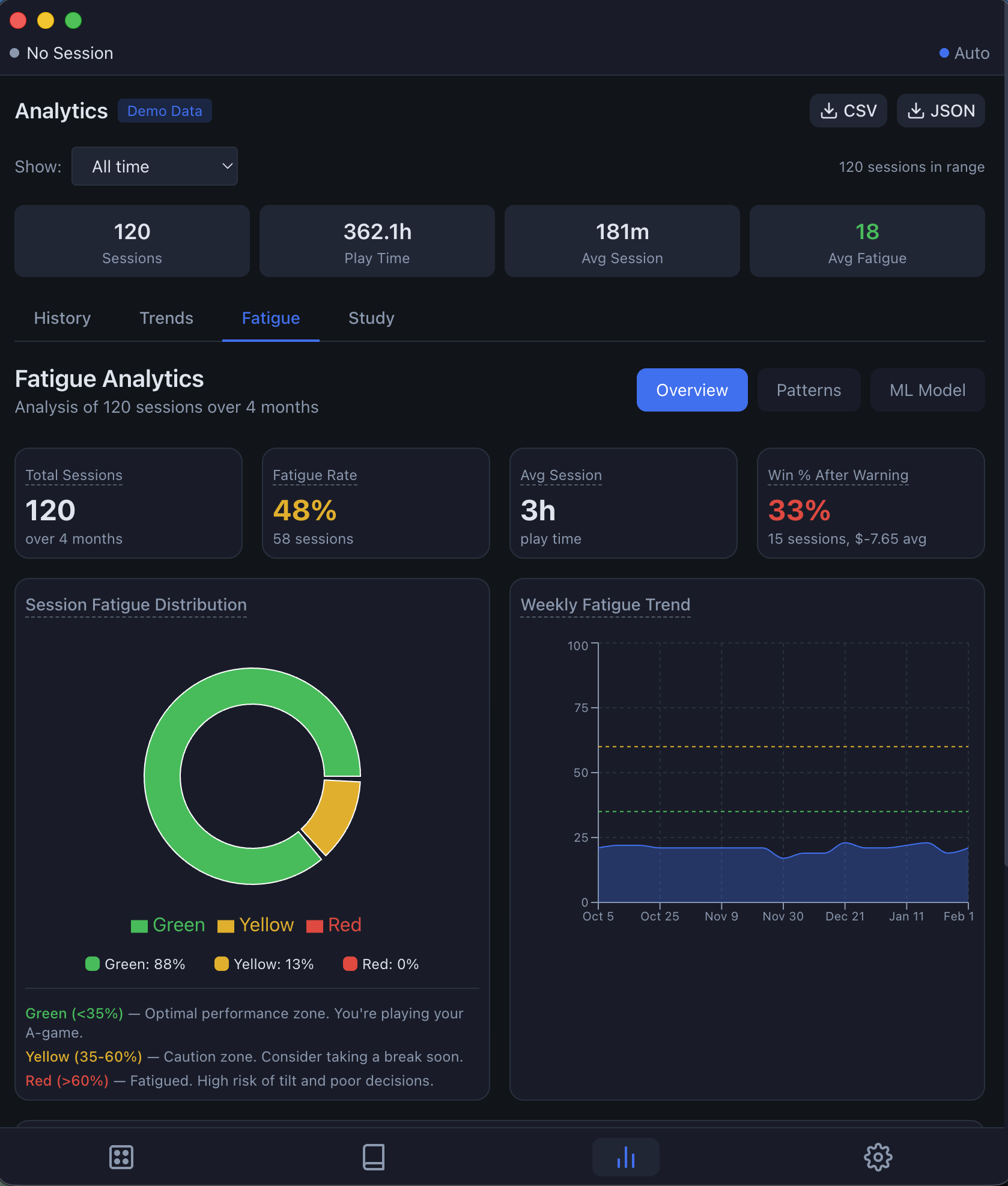
Fatigue analytics with ML insights
See your fatigue distribution (green/yellow/red zones), win rate after warnings, and even a personalised ML model that learns what factors predict YOUR fatigue.
- Personal fatigue distribution
- Win % after fatigue warnings
- ML model with feature importance
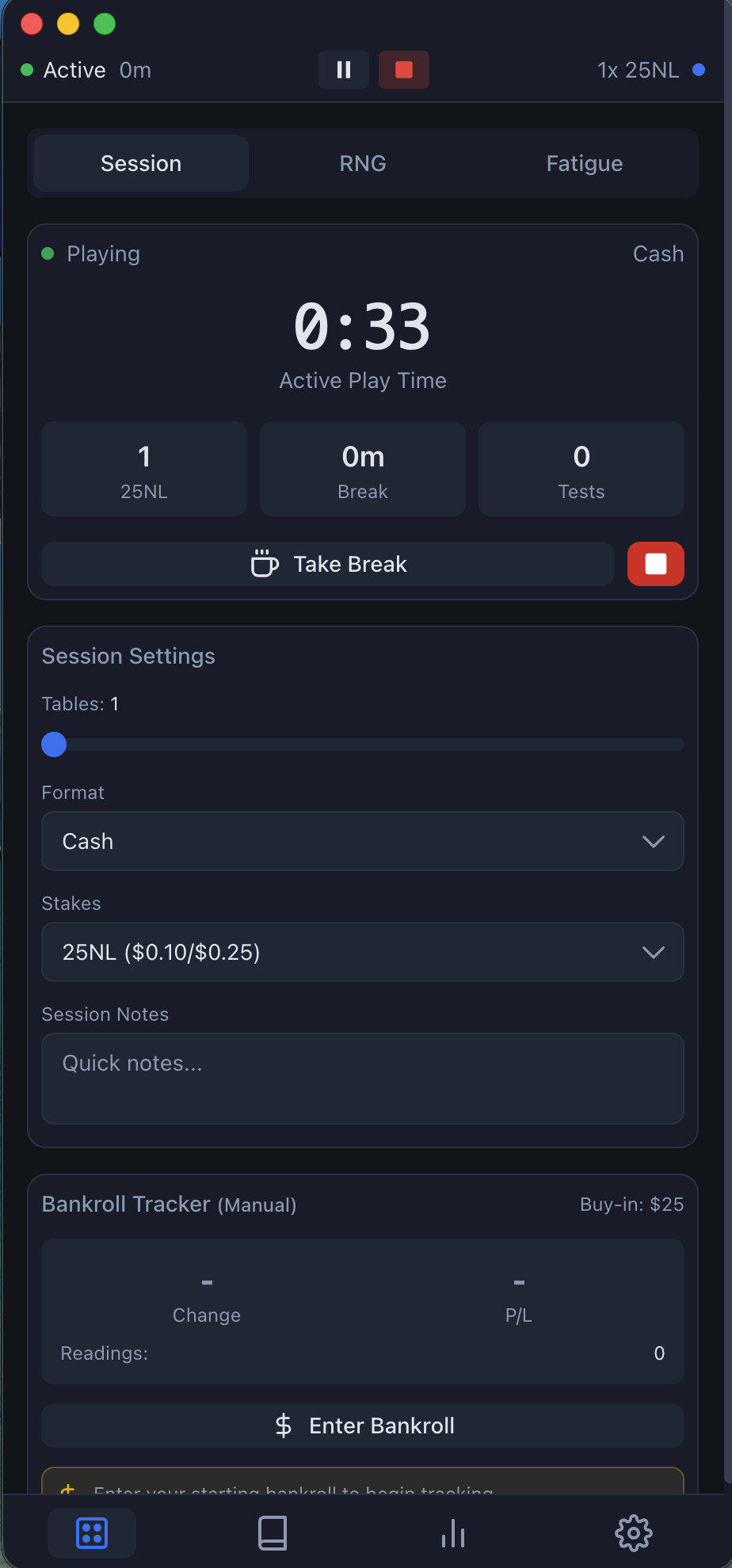
Session tracking that adapts to you
Track active play time, tables, and stakes. Log session notes, take breaks, and monitor your bankroll in real-time with manual entry or OCR capture.
- Auto-detects poker tables
- Tracks breaks and fatigue tests
- Bankroll tracking with OCR
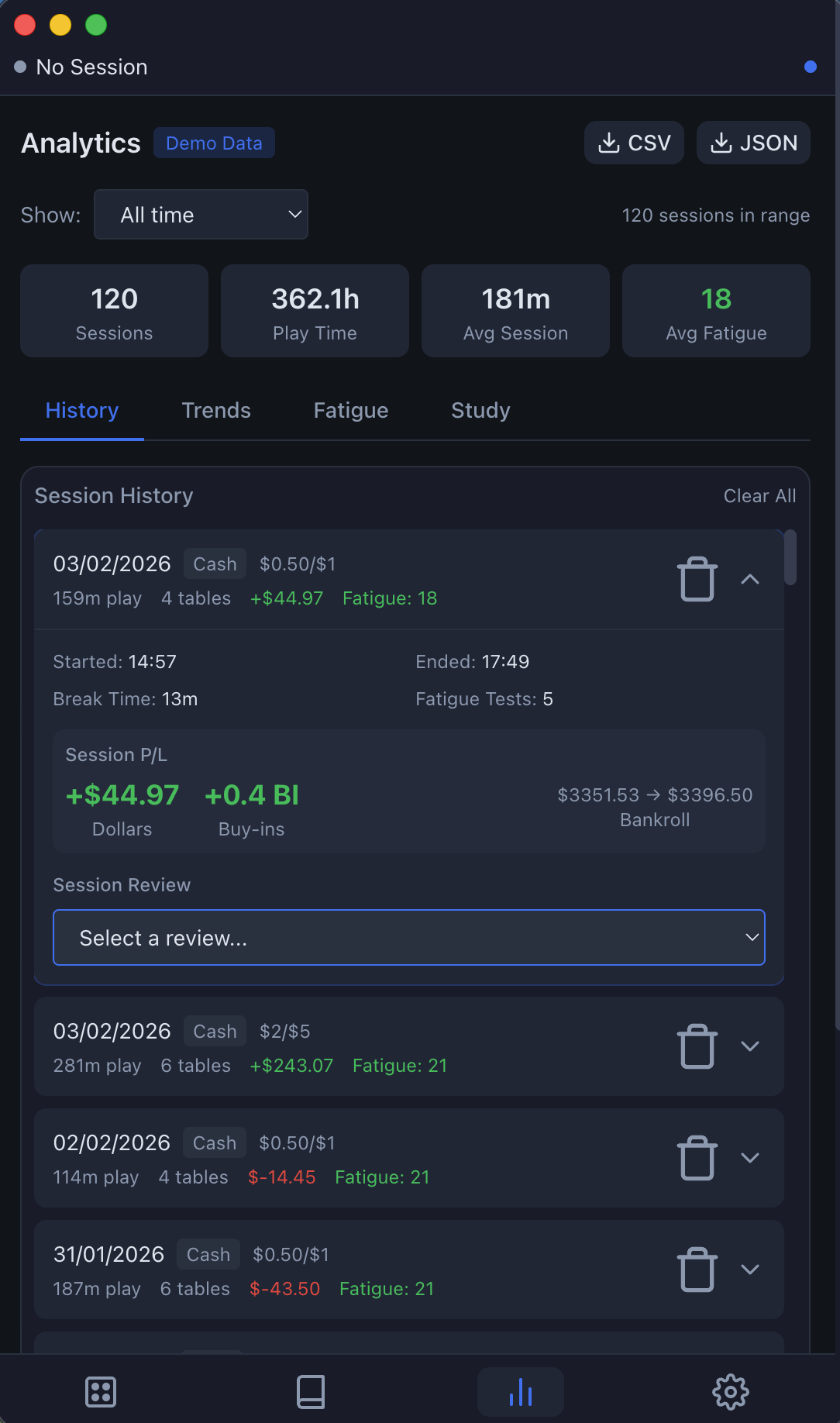
Complete session history
Every session logged with full details — duration, tables, P/L, fatigue scores. Expand any session to see start/end times, break duration, and add post-session reviews.
- Filter by date range
- Export to CSV or JSON
- Session reviews and takeaways
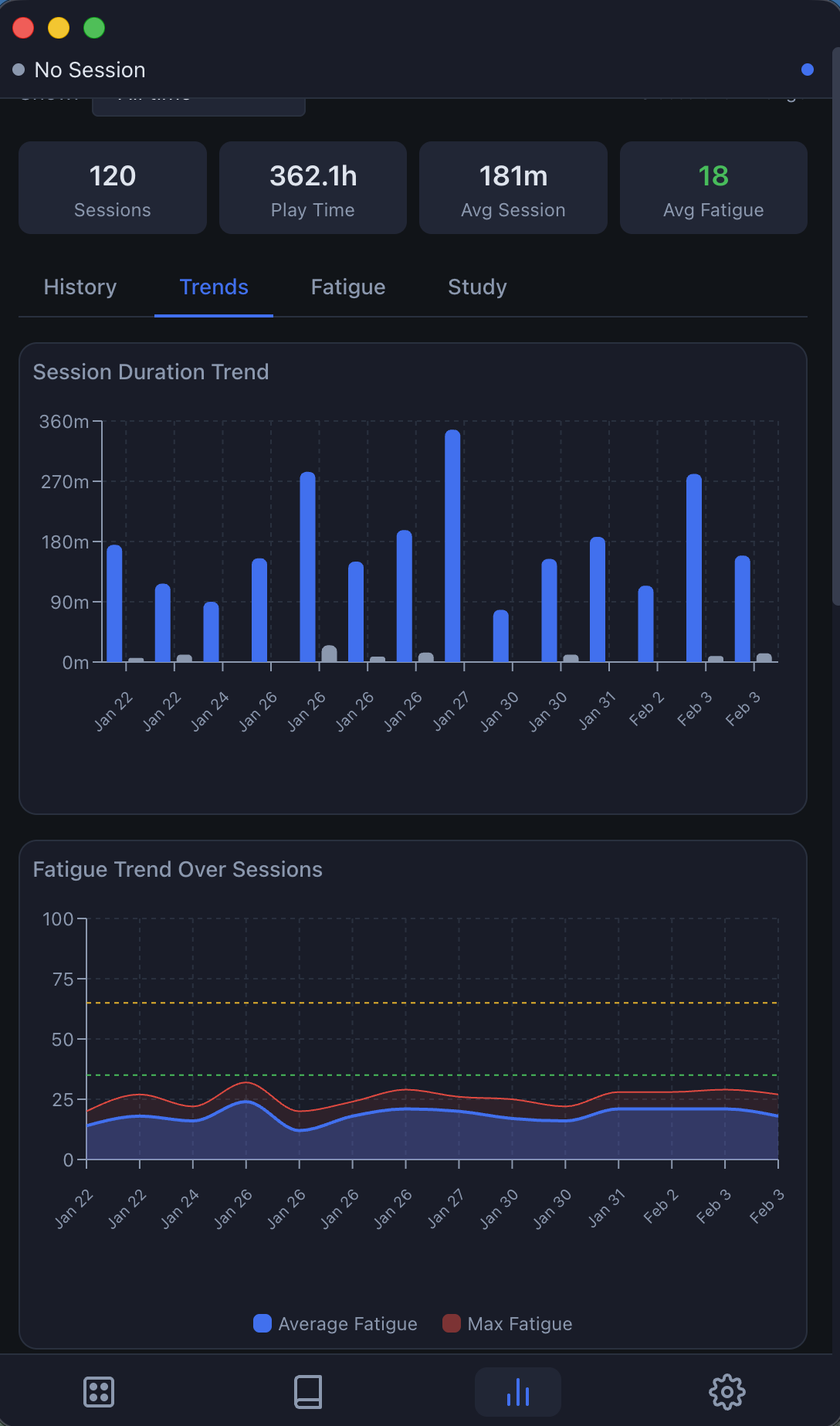
Visualise your patterns
Session duration trends, fatigue patterns over time, and performance correlations. See how your play evolves and identify what works for you.
- Duration trends over sessions
- Fatigue trend with threshold lines
- Average vs max fatigue tracking
GTO RNG at your fingertips
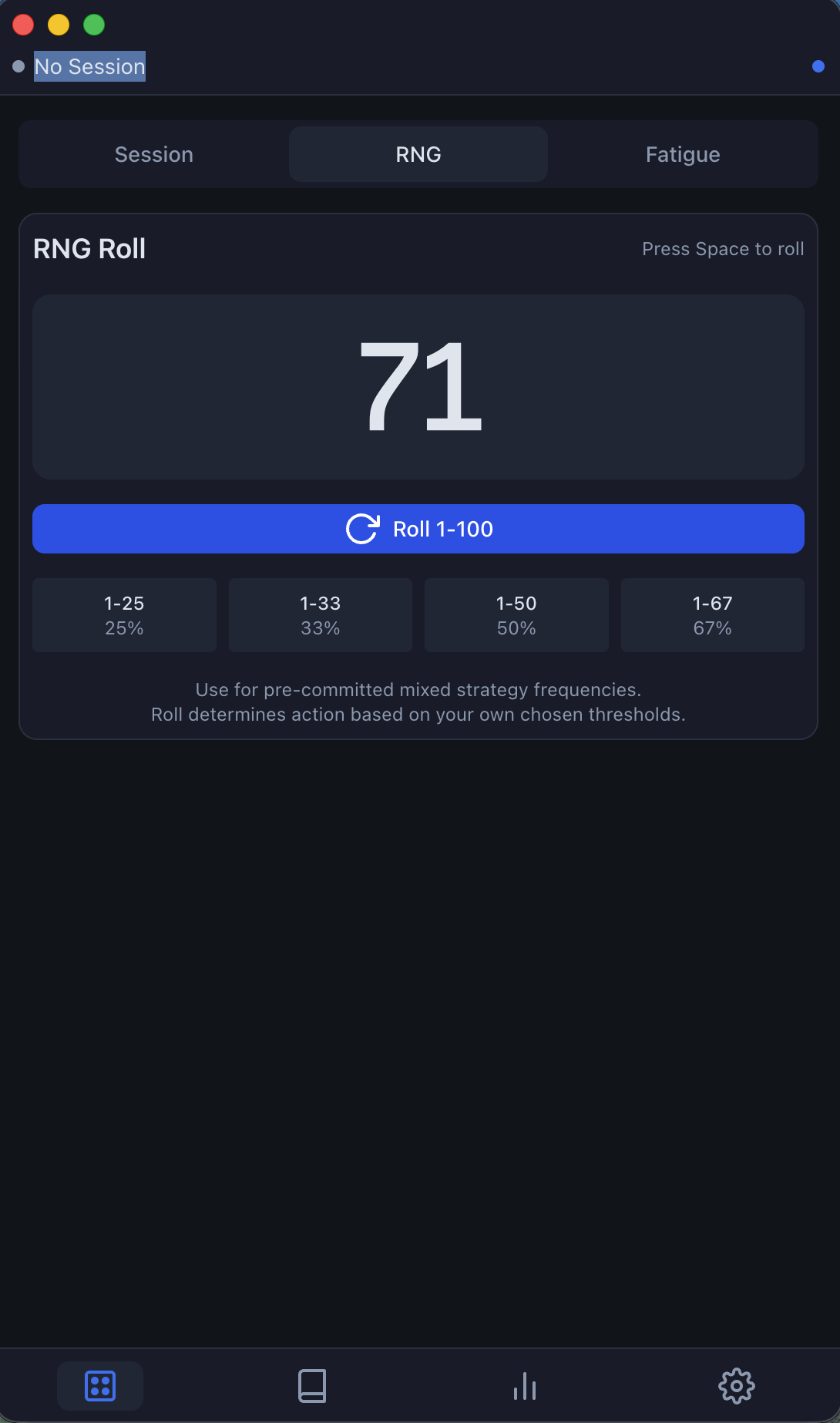
Roll 1-100 with a single hotkey. Use the quick-select thresholds (25%, 33%, 50%, 67%) or define your own frequencies for any mixed strategy spot.
- Hotkey triggered — press Space to roll
- Common thresholds pre-set
- Clean, distraction-free UI
Track your study too
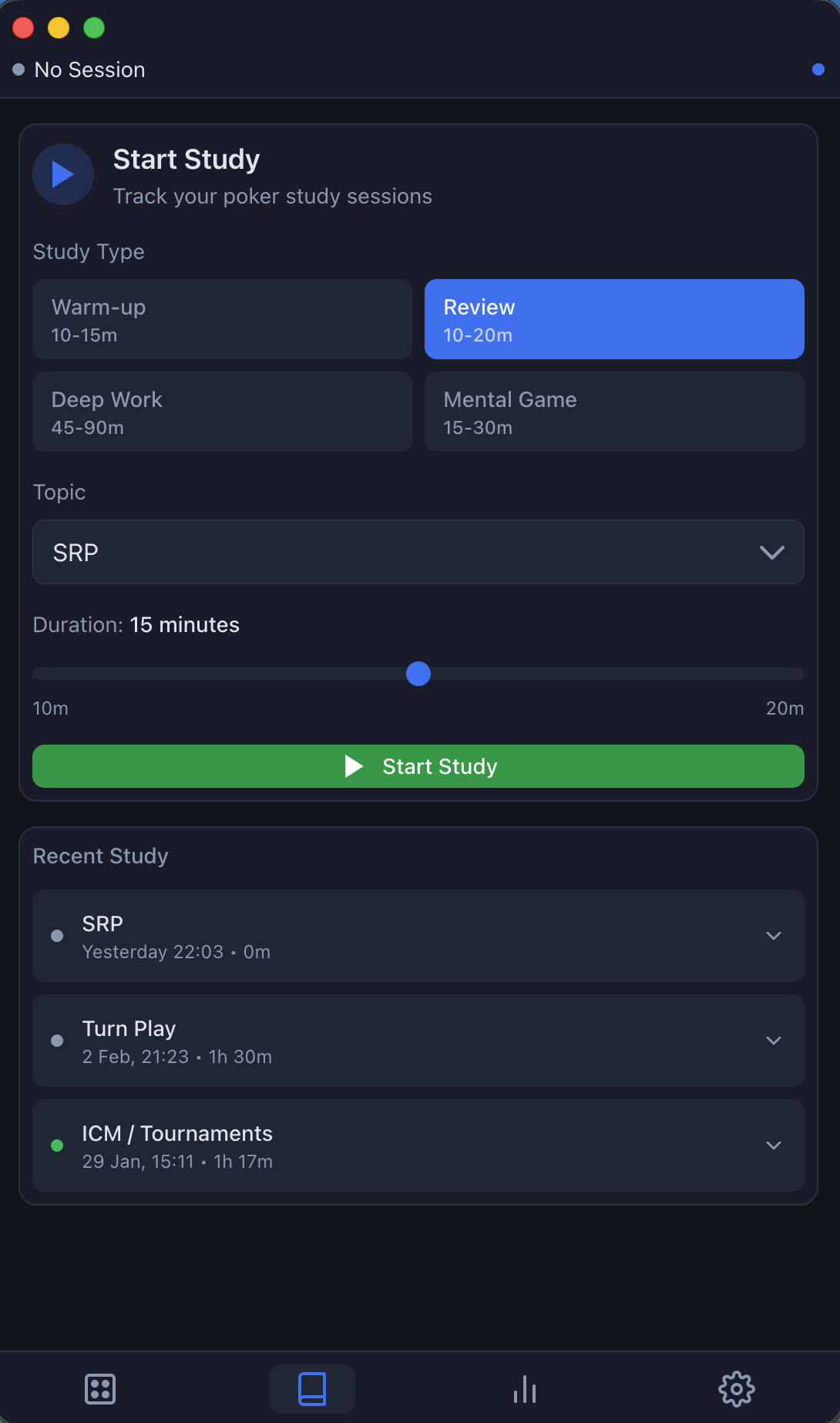
Not just play — GrindGuard tracks your off-table work too. Log warm-ups, reviews, deep work, and mental game sessions. See study trends and maintain consistency.
- Study types: Warm-up, Review, Deep Work, Mental Game
- Topic categorisation (SRP, Turn Play, ICM, etc.)
- Focus ratings and session takeaways
Knowing GTO isn't the same as executing it.
You've studied the ranges. You know you should bluff 40% of the time, value-bet 60%, or mix between two sizes. But in real play, how do you actually pick the right action at the right frequency — without pattern bias, tilt, or "feel"?
And even if you're executing well, how do you know when to stop? Fatigue doesn't announce itself — but we can.
What GrindGuard actually does
GTO RNG
A hotkey-accessible poker RNG that helps you execute mixed strategies — bet vs. check, bluff vs. give up, small vs. large sizing — based on the frequencies you define. Roll manually or get prompted at decision points. No more guessing, no more bias.
Session discipline
Track active play time with session timers and break reminders. Set pre-planned stop rules so you stick to your intended session length and volume. Paid plans add personalised thresholds and custom rulesets that adapt to your fatigue patterns — enforcing the routine you intended to follow, not what feels right in the moment.
Fatigue detection
Optional cognitive checks when fatigue thresholds are hit. Know when you're still sharp — and when it's time to stop before your edge erodes.
Supported Poker Sites (Auto Table Detection Enabled)
GrindGuard's table detection works with major poker clients. More sites being added regularly.
Don't see your site? Let us know — we prioritise based on demand.
What GrindGuard is
- A poker RNG tool for executing mixed strategies with hotkey access
- A session discipline and fatigue management tool that monitors play time and cognitive performance
- A way to enforce your pre-planned session rules and stop decisions
- Uses screen monitoring to detect tables and track bankroll — but doesn't analyze hands or provide strategy
What GrindGuard is NOT
- Not RTA — doesn't analyze hands, read player stats, or recommend actions
- Not a HUD — doesn't overlay stats on poker tables
- Not a solver — doesn't calculate GTO solutions or provide strategy advice
- Not connected to poker sites — only monitors visible screen content
- Not playing for you — all decisions remain yours
The GTO RNG
GrindGuard's RNG is built for real poker execution — not solver porn. Here's how it works:
Hotkey-triggered rolls
Roll on demand with a simple hotkey (default: Space) to get an instant 1-100 result. You can trigger it manually whenever you need a decision, or let the app prompt you at key moments based on your settings.
Quick thresholds and custom frequencies
Common mixing frequencies are pre-set for instant reference: 25%, 33%, 50%, and 67%. One click shows you the threshold. But you can also define custom frequencies for any spot — 40% bluff, 60% value, or whatever your study says.
You set the frequency. You trigger the roll. You execute the decision.
Strategy-agnostic design
GrindGuard doesn't connect to poker sites, analyze hands, or know what cards you're holding. While it monitors your screen to detect tables and track bankroll, it never provides strategy advice or recommendations. It's a randomiser and session tool — not a coach or solver.
Optional integration with discipline tools
Combine the RNG with session timers, break reminders, and fatigue checks. Use one or use all — GrindGuard adapts to how you play.
Think of it like a RNG you'd use to simulate spots — but built for live decision-making, available instantly with a hotkey.
Detect fatigue before it destroys your execution.
Mental fatigue is invisible while you're in it — but it quietly erodes decision quality, timing, and discipline. GrindGuard's Fatigue Tracker turns that invisible decline into an objective signal you can't rationalise away.
Baseline calibration
When you first use GrindGuard, you complete a short baseline test while fresh. This establishes your normal reaction speed and accuracy — not a generic population average.
- Takes under 3 minutes
- Performed when you're rested
- Used only as a personal reference point
This baseline becomes the anchor for all future fatigue detection.
Session aware tracking
Fatigue is contextual — GrindGuard understands that. It continuously tracks:
- Session duration
- Cumulative daily load
- Break timing and spacing
- Recent play patterns
Over time, it personalises fatigue expectations based on how you respond to long sessions — not how someone else does.
The result: smarter, individualised thresholds instead of fixed timers.
Periodic performance checks
Prove you're still sharp — don't guess. At key points (long sessions, delayed breaks, heavy volume), GrindGuard prompts a short cognitive check designed to detect early performance drift.
These checks are:
- Fast and non-intrusive
- Unrelated to poker strategy
- Focused on reaction, consistency, and accuracy
You're not being tested to "pass" — you're measuring change relative to your own baseline.
Objective recommendations
Remove emotion from stop decisions. When performance drops meaningfully relative to your baseline, GrindGuard gives a clear recommendation:
No tilt. No bargaining. No "one more orbit." Just an objective signal based on your data.
Gets smarter over time
The more you use it, the better it gets. GrindGuard learns how fatigue shows up for you:
- How quickly performance drops
- How effective breaks are
- Which session lengths are sustainable
This allows future recommendations to become more accurate and less conservative — protecting EV without unnecessarily cutting volume.
GrindGuard's fatigue tracking is strategy-agnostic and does not analyse gameplay or hands. It measures cognitive performance only.
Start free. Execute better. Stop guessing when you're tired.
GrindGuard tells you when decision quality drops — before it costs you money. The GTO RNG and core session tools are free. Upgrade anytime for advanced fatigue detection, smarter rules, and session insights.